
If you spend most of your working day in front of a computer, it is probably familiar: your shoulders gradually creep upwards, your neck begins to feel tight, your lower back becomes uncomfortable and standing up after a long meeting feels harder than it should.
The problem is not necessarily that you have been sitting in the “wrong” posture. Often, it is simply that your body has stayed in one position for too long.
Regular movement, changes of position and a few simple stretches can help break up prolonged periods of desk work and keep you feeling more comfortable throughout the day.
The UK Health and Safety Executive (HSE) recommends that prolonged display-screen work is interrupted with regular breaks or changes of activity that allow workers to move, stretch and change posture. Short, frequent breaks are generally preferable to occasional long ones.
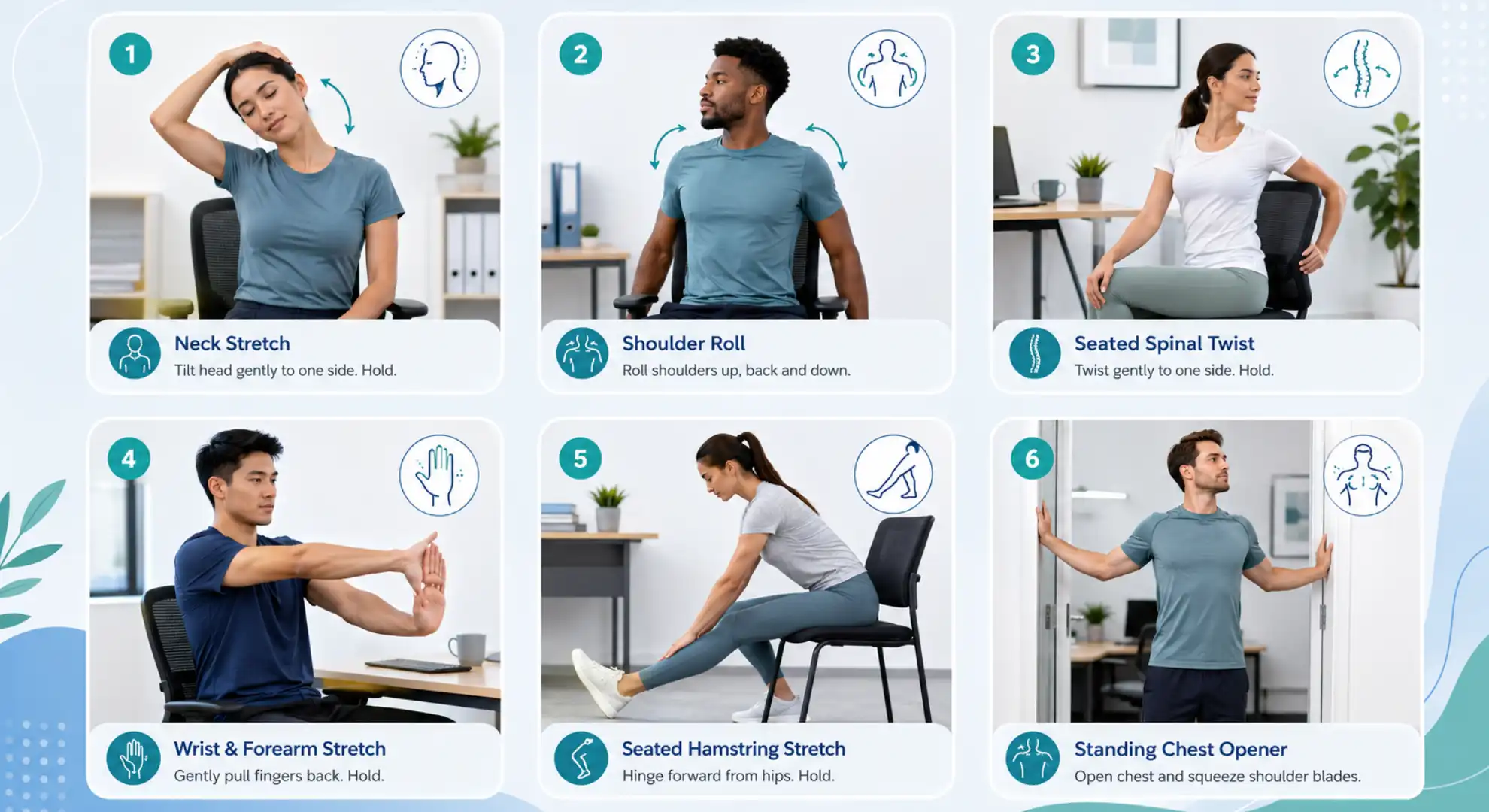
Here are five simple stretches for desk workers that you can perform with little or no equipment.
What Are the Best Stretches for Desk Workers?
If you want the quick answer, five useful movements to include during your working day are:
- Neck rotation stretch – for neck mobility
- Doorway chest stretch – for the chest and front of the shoulders
- Seated thoracic extension – for the upper and mid-back
- Hip flexor stretch – for the front of the hips
- Seated figure-four stretch – for the hips and gluteal muscles
You do not need to perform all five every hour.
Think of them as simple movement options that can be used throughout the day whenever you have been sitting for an extended period.
Why Does Desk Work Make You Feel Stiff?
Sitting itself is not inherently harmful.
The issue is often prolonged, uninterrupted time in the same position.
Desk-based work may involve hours of:
- Looking towards a screen
- Using a keyboard and mouse
- Keeping the hips and knees bent
- Performing relatively little upper-back movement
- Moving the shoulders and arms through a limited range
- Remaining in one position while concentrating
The HSE identifies remaining in one position for long periods and poorly arranged display-screen workstations among factors that may contribute to musculoskeletal discomfort.
This can leave some people noticing:
- Neck stiffness
- Tight shoulders
- Upper-back discomfort
- Lower-back aching
- Tightness around the hips
- Headaches
- General fatigue
Stretching may help you feel more mobile, but it should be considered alongside regular movement, sensible workstation setup and appropriate exercise, rather than treated as a complete solution on its own.
Stretch 1: Gentle Neck Rotation
Your neck spends a large part of the working day facing forwards towards your screen.
A simple neck rotation helps introduce movement in the opposite direction and can be useful when your neck starts feeling stiff.
How to Do It
- Sit or stand comfortably with your shoulders relaxed.
- Keep your head upright.
- Slowly turn your head towards your right shoulder.
- Move only as far as feels comfortable.
- Pause briefly.
- Return to the centre.
- Repeat towards the left.
Perform several slow repetitions on each side.
You can also hold the comfortable end position for around 10–20 seconds if you prefer a sustained stretch.
What Should You Feel?
You may notice a gentle stretch around the side or back of your neck.
You should not experience sharp pain, dizziness, pins and needles or increasing symptoms down your arm.
Desk Tip
Check whether your computer screen is positioned directly in front of you.
The HSE recommends positioning your main screen centrally to avoid repeatedly twisting your neck and back while working.
Stretch 2: Doorway Chest Stretch
Typing, using a mouse and working on a laptop all involve spending significant time with your arms positioned in front of your body.
A doorway chest stretch can provide a comfortable change of position for your shoulders and chest.
How to Do It
- Stand in an open doorway.
- Place one forearm against the door frame.
- Keep your elbow roughly level with or slightly below your shoulder.
- Take a small step forwards.
- Gently rotate your body away from the arm.
- Stop when you feel a comfortable stretch across your chest or front of the shoulder.
- Hold for around 20–30 seconds.
- Repeat on the opposite side.
Try one or two repetitions per side.
Don’t Force the Shoulder
The aim is not to push your arm as far behind you as possible.
A mild, comfortable stretch is enough.
If you have an existing shoulder injury or the movement produces pain at the front or top of your shoulder, reduce the range or stop.
Stretch 3: Seated Thoracic Extension
The thoracic spine is the middle and upper part of your back.
Desk work often involves spending long periods with this area relatively still. Introducing gentle extension can provide a useful movement break.
How to Do It
- Sit on a stable chair with a backrest.
- Place your feet comfortably on the floor.
- Bring your hands behind your head or cross your arms over your chest.
- Position the upper edge of the chair against your mid-back.
- Gently lean backwards over the chair.
- Allow your upper back to extend while keeping the movement comfortable.
- Return slowly to your starting position.
Repeat 5–8 controlled times.
Alternative: Standing Upper-Back Stretch
If your chair is unsuitable:
- Stand upright.
- Place both hands on your hips.
- Gently lift your chest.
- Draw your shoulders slightly backwards.
- Return to neutral.
Repeat several times.
Why It Can Be Useful
This movement gives the upper back a change from the relatively fixed position used during screen work.
It can be particularly pleasant after long periods of typing or video meetings.
Stretch 4: Hip Flexor Stretch
Your hip flexors are located around the front of your hips.
When sitting, your hips remain flexed for extended periods. Standing and gently moving the hips in the opposite direction can provide a useful break.
How to Do It
A standing version is easy to perform at work.
- Stand in a split stance with one foot forwards and one foot behind.
- Keep your body upright.
- Slightly bend both knees.
- Gently tuck your pelvis underneath you.
- Shift your weight forwards without arching your lower back excessively.
- You should feel a stretch near the front of the hip on the back leg.
- Hold for approximately 20–30 seconds.
- Change sides.
Repeat once or twice on each side.
Common Mistake
Do not try to create a bigger stretch by dramatically arching your lower back.
Keep the movement small and controlled.
Stretch 5: Seated Figure-Four Hip Stretch
The figure-four stretch targets the hip and gluteal region and can be performed without leaving your chair.
How to Do It
- Sit towards the front of a stable chair.
- Place both feet on the floor.
- Lift your right ankle and rest it across your left thigh.
- Allow your right knee to move comfortably outwards.
- Keep your back relatively straight.
- Gently lean forwards from your hips.
- Stop when you feel a stretch around your right buttock or outer hip.
- Hold for 20–30 seconds.
- Repeat on the opposite side.
Keep It Comfortable
Never push down aggressively on your knee.
If you have a hip or knee problem that makes this position uncomfortable, skip this stretch and choose a different movement.
Quick Desk Stretch Routine
Short on time?
Try this simple routine when you have been working at your computer for an extended period:
- Exercise Suggested Amount
- Neck rotations 5 each side
- Chest stretch 20–30 seconds each side
- Thoracic extensions 5–8 repetitions
- Hip flexor stretch 20–30 seconds each side
- Figure-four stretch 20–30 seconds each side
The whole routine can take approximately five minutes.
However, you do not need to wait until you feel extremely stiff before moving.
The HSE recommends breaking up prolonged display-screen work and notes that short, frequent breaks are generally better than less frequent longer breaks. As an example, it suggests that 5–10 minutes away from continuous screen work each hour can be preferable to a 20-minute break every two hours.
That break does not have to mean stopping work completely.
You might:
- Stand while making a phone call
- Walk to speak to a colleague
- Get a drink
- Perform a few stretches
- Change to a different task
- Walk briefly around the office
- Stand during part of an online meeting
Movement variety is the goal.
Is Stretching Enough If You Sit at a Desk All Day?
Probably not on its own.
Stretching can feel good and help introduce movement into your working day, but it does not replace general physical activity or strengthening.
If you regularly experience discomfort at your desk, consider combining stretching with:
- Regular walking
- Strength training
- General aerobic exercise
- Frequent changes of working position
- A suitable workstation setup
- Appropriate breaks from screen work
You do not need extraordinary flexibility to work comfortably at a desk.
Your body generally benefits more from being strong, active and regularly moving than from trying to achieve extreme ranges of flexibility.
Don’t Forget Your Workstation
Exercises can be helpful, but repeatedly stretching while continuing to work at a badly arranged workstation may only address part of the problem.
The HSE recommends several basic principles for display-screen workstations.
Screen
Your screen should generally be:
Directly in front of you
Approximately an arm’s length away
Positioned so that the top of the screen is around eye level
Shoulders
Try to keep your shoulders relaxed rather than continually shrugged upwards.
Keyboard
Your keyboard should be positioned so you can work without reaching excessively forwards.
The HSE suggests positioning it around or slightly below elbow height.
Mouse
Keep the mouse close enough that you do not constantly reach forwards or sideways.
Chair
Your chair should provide appropriate support and allow your feet to be comfortably supported.
The goal is not to hold one supposedly perfect position from 9am until 5pm.
Even a well-designed working position benefits from regular changes of posture and movement.
What About Working From a Laptop?
Laptop working presents a particular challenge because the keyboard and screen are attached.
If the screen is at a comfortable height, the keyboard may be too high.
If the keyboard is comfortable, the screen may be too low.
For prolonged laptop use, the HSE advises considering a separate keyboard and mouse so the laptop screen can be raised to a more appropriate height.
A simple setup might include:
- Laptop stand
- Separate keyboard
- Separate mouse
- Supportive chair
- Clear desk space
This is especially relevant for people working from home several days each week.
How Often Should Desk Workers Stretch?
There is no universal rule saying every office worker must perform a particular stretch at a precise interval.
Instead of thinking:
“I need to stretch for exactly 30 seconds every hour.”
Try thinking:
“How can I avoid remaining completely still for several hours?”
Regular small changes can include:
- Standing up
- Changing sitting position
- Walking
- Stretching
- Taking telephone calls away from your screen
- Switching temporarily to a non-screen task
HSE guidance specifically recommends taking breaks before fatigue becomes significant, rather than waiting until you are already uncomfortable.
Is There Such a Thing as Perfect Desk Posture?
People often come to physiotherapy worried that years of “bad posture” have permanently damaged their neck or back.
Posture certainly affects how your body is loaded, and an uncomfortable workstation can contribute to symptoms.
However, one position is unlikely to be ideal for every person throughout an entire working day.
A practical target is to find a comfortable working position that allows you to change position regularly.
Try not to spend the whole day consciously pulling your shoulders backwards or forcing yourself to sit rigidly upright.
Comfortable support plus frequent movement is usually much more realistic.
Why Do My Neck and Shoulders Hurt After Desk Work?
Neck and shoulder discomfort during desk work can have many contributing factors.
These may include:
- Long periods without movement
- Repetitive mouse or keyboard use
- Screen position
- Workstation height
- Stress
- Fatigue
- Previous neck or shoulder problems
- Reduced physical activity
- Working for extended periods on a laptop
The HSE recommends that employers carry out a display-screen equipment assessment for workers who regularly use DSE and reassess a workstation when users report pain or discomfort.
If adjusting your workstation and increasing movement does not improve persistent symptoms, a physiotherapy assessment may help identify other contributing factors.
Can Desk Work Cause Headaches?
Long periods of screen work can sometimes be associated with headaches, although headaches can have many causes.
Neck and shoulder tension, visual fatigue and prolonged concentration may all contribute for some people.
The HSE notes that extended periods of display-screen work can cause temporary eye discomfort and headaches, and recommends regular screen breaks and appropriate screen positioning.
If you experience new, severe, persistent or unusual headaches, seek appropriate medical advice rather than assuming they are caused by your desk.
When Should You See a Physiotherapist?
Occasional stiffness after a long working day is common.
However, consider seeking physiotherapy advice if:
- Neck or back pain keeps returning
- Symptoms are affecting your work
- Pain persists despite changing your workstation
- You experience recurring shoulder discomfort
- You are unsure which exercises are appropriate
- Your movement feels increasingly restricted
- Symptoms repeatedly spread into an arm or leg
- You want help improving your workstation and movement habits
A physiotherapist can assess more than just where you feel pain.
An assessment may consider:
- Neck and back movement
- Shoulder mobility
- Muscle strength
- Work habits
- Workstation setup
- Previous injuries
- Physical activity
- Activities outside work
This allows advice and exercises to be tailored to you rather than relying on a generic stretching routine.
Physiotherapy for Desk Workers in Amesbury
For people working in Amesbury, Wiltshire and the surrounding area, long hours spent at computers are increasingly common, particularly with hybrid and home working.
At Amesbury Physiotherapy, we can help assess persistent neck, shoulder, back or other musculoskeletal symptoms that may be affecting your working day.
Rather than simply telling you to “sit up straight”, physiotherapy can help identify the factors relevant to your symptoms and develop a practical plan that may include:
- Individualised exercises
- Mobility work
- Strengthening
- Advice on activity
- Workstation considerations
- Strategies for managing recurring symptoms
The aim is to help you move more comfortably and confidently, both at your desk and away from work.
Frequently Asked Questions About Stretches for Desk Workers
What are the best stretches for sitting at a desk all day?
Useful options include neck rotations, chest stretches, upper-back extensions, hip-flexor stretches and gluteal stretches. The best exercises depend on where you feel stiff and whether you already have an injury.
How often should office workers stand up?
There is no single legally prescribed interval suitable for every job. UK HSE guidance recommends short, frequent breaks or changes of activity during prolonged display-screen work and gives 5–10 minutes each hour as an example that can be preferable to longer, less frequent breaks.
Can stretching help neck pain from working at a computer?
Gentle movement and stretching may help some people with stiffness or discomfort, particularly when combined with changes to prolonged working positions. Persistent or worsening neck pain should be individually assessed.
What stretch helps tight hips from sitting?
A standing hip-flexor stretch and seated figure-four stretch are two simple options. You can also help by regularly standing and walking rather than relying exclusively on stretching.
Should I stretch my lower back at work?
Gentle movement can be useful, but you do not necessarily need aggressive lower-back stretching. Standing, walking and moving your spine comfortably through different positions may be enough for many people.
How can I stop my shoulders becoming tight at my desk?
Keep your keyboard and mouse within comfortable reach, avoid repeatedly shrugging your shoulders, change position regularly and incorporate movement throughout your working day. HSE guidance recommends keeping the shoulders relaxed and positioning the keyboard and mouse appropriately.
Is sitting all day bad for my back?
Long periods spent in one position can contribute to discomfort for some people. Instead of trying to avoid sitting completely, aim to break up extended periods with standing, walking and changes of activity.
Should I buy a standing desk?
A standing desk can provide another working-position option, but standing all day is not necessarily the answer either. If you use one, alternate between sitting and standing rather than replacing one prolonged static posture with another.
Can a physiotherapist help with desk-related neck and back pain?
Yes. A physiotherapist can assess your symptoms, movement, strength and working habits and help determine whether exercise, activity modification or other treatment may be appropriate.
A Simple Rule for Desk Workers: Your Best Posture Is Often Your Next Posture
It is easy to become obsessed with creating the perfect office setup.
Ergonomics matter, but movement matters too.
Even an excellent chair, expensive standing desk and perfectly positioned monitor cannot make remaining completely still for hours ideal.
Throughout your working day:
- Change position regularly
- Stand up
- Walk when possible
- Move your neck and shoulders
- Stretch your hips
- Take breaks from your screen
- Stay physically active outside work
Your body was designed to move.
Feeling Stiff or Uncomfortable at Your Desk?
If neck, shoulder, back or hip discomfort is repeatedly affecting your working day, it may be worth understanding why the symptoms keep returning rather than simply stretching through them.
At Amesbury Physiotherapy, we can assess your symptoms and help you develop a practical plan to improve movement, strength and comfort at work.
Contact Amesbury Physiotherapy to arrange an assessment and take the next step towards a more comfortable working day.
This article provides general information and is not intended to diagnose a condition or replace personalised healthcare advice. Stop any exercise that causes significant pain, dizziness, numbness, pins and needles or worsening symptoms, and seek appropriate medical or physiotherapy advice if you are concerned.